



Choosing the right laptop for work or business can be overwhelming.
With so many models, specifications, and price points, it can be difficult to determine what you actually need and how much it is worth spending. Higher-spec laptops cost more, but whether you need those specs depends on how the laptops will be used.
Understanding the difference between entry-level and high-end laptops comes down to how the device is used each day. How many hours are spent on it, how many programs you run, and whether you’re handling basic tasks like emails and web browsing or more demanding workloads that involve large files and resource-intensive software.
Choosing the right performance level ensures your laptop can keep up with your workloads without slowing you down.
This guide breaks down the key differences between entry-level and high-end laptops. We’ll explain performance levels, specifications, and typical use cases so you can choose a device that matches your requirements and budget.
Entry-Level vs High-End Laptops: Basic Overview
The specifications below are general guidelines. Actual performance will vary depending on the specific model and configuration.
| Feature | Entry-Level Laptop | High-End Laptop |
|---|---|---|
| Daily workload | Email, browsing, light apps | Multitasking, large files, multiple apps |
| Processor (CPU) | Mid-range (e.g., Intel Core 5, Ryzen 5) | High-performance (e.g., Intel Core 7/Ultra, Ryzen 7/9) |
| RAM | 8GB | 16GB+ |
| Storage | 256GB SSD | 512GB – 1TB + SSD |
| Multitasking ability | Limited (can slow with multiple apps) | Smoother across multiple apps |
| Graphics capability | Integrated | Advanced/dedicated |
| Build quality | Functional, designed for lighter use | More durable, better finish, designed for daily heavy use |
| Expected lifespan | 2-3 years | 4-6+ years |

What is an Entry-Level Laptop?
In this guide, an entry-level laptop is a device best suited to basic business use.
An entry-level laptop can comfortably handle lighter, day-to-day tasks such as email, web browsing, Microsoft 365, cloud-based platforms, video calls, and standard office applications. Entry-level laptops are often on the cheaper end due to their lower specifications, but the important distinction is that entry-level does not automatically mean low quality.
In a business context, it means the minimum specification that delivers reliable performance for lighter-use roles. The goal is to find a model that keeps your team productive without the cost of hardware features they’ll never use.
Who are they suited for? Entry-level laptops are a natural fit for administrative staff, front-of-house roles, shared office devices, and anyone whose daily tasks revolve around browser-based tools or standard business applications.
What is a High-End Laptop?
In this guide, a high-end laptop refers to a laptop that offers premium performance. Built for those who can’t afford slowdowns, high-end laptops have the capacity to handle multiple applications at once, store larger files, and run more demanding software.
Think: working across spreadsheets and business systems at the same time, running video calls alongside other open applications, or using specialised software for design or engineering tasks.
In a business context, high-end is less about prestige and more about performance.
Who are they suited for? High-end laptops are best suited to users whose work involves heavier, continuous use throughout the day. This typically includes roles in which multiple systems are open simultaneously, and employees often work with large files or demanding applications.
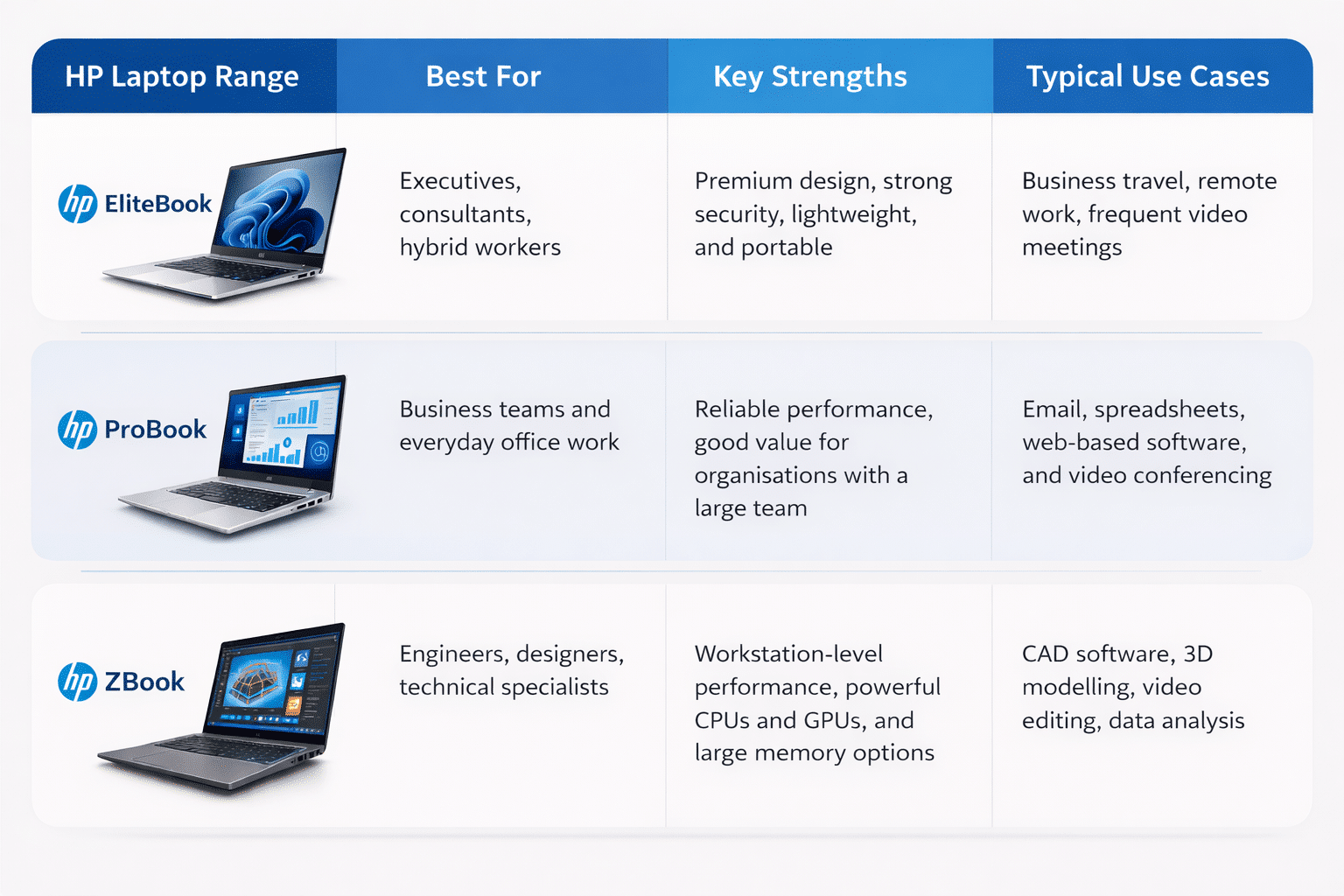
Key Specification Differences Between Entry-Level and High-End Laptops
Let’s take a closer look at how key specifications influence daily performance in entry-level and high-end laptops in a business environment.
Processor (CPU)
The processor is the main chip inside the laptop that determines how quickly a laptop can execute tasks and respond under load.
Entry-Level: Typically use mid-range processors such as Intel Core i5 or AMD Ryzen 5. These are good for handling email and standard office applications, but performance can drop when handling larger spreadsheets or multiple applications.
High-End: Use more powerful processors such as Intel Core i7, Intel Core Ultra 7, or AMD Ryzen 7/9. These are designed for heavier workloads and suited to roles such as accountants, engineers, and project managers who work with multiple systems at once.
Memory (RAM)
RAM, or Random Access Memory, is the laptop’s short-term working memory. It temporarily stores data in use, allowing the laptop to switch quickly between tasks.
Entry-Level: Typically 8GB RAM. This is suitable for employees who work with limited applications, such as email, documents, and a web browser.
High-End: Usually 16GB or more. Required for roles such as operations managers, consultants, and finance teams who run many applications at once. This includes video calls, spreadsheets, and cloud platforms.
Storage (SSD Capacity and Speed)
Storage is where all files, applications, and data are permanently saved. Most modern laptops use SSDs, which are fast and reliable. Larger and faster SSDs also affect how quickly applications open and how responsive the laptop is.
Entry-Level: Typically 256GB SSD. Enough for simpler platforms like Microsoft 365, Xero or browser-based CRMs, but can fill up quickly if storing things like high-resolution marketing videos or large downloaded datasets.
High-End: Usually 512GB-1TB SSD. Better for those who store working content locally, such as marketing teams managing campaign assets or project-based roles that handle larger volumes of data.
Graphics Capability (GPU)
The graphics processing unit (GPU) is responsible for rendering images, videos, and other visual content. In many laptops, this is built into the CPU (integrated graphics), while higher-end models may include a separate GPU.
Entry-Level: Integrated graphics (e.g., Intel Iris Xe or AMD Radeon Graphics) are good enough for general business use, including presentations, video calls, and web applications.
High-End: Dedicated or higher-performance graphics (e.g., NVIDIA RTX series) are often required for graphic designers, video editors, architects, and engineers using software such as Adobe Creative Cloud or AutoCAD.
Mobile workstations like the HP ZBook X G1i are designed for these types of workloads and are often configured with a dedicated GPU for handling complex visual and rendering tasks:

Rent/Lease/Buy HP ZBook X G1i 16-inch Ultra 9 Business Laptop
For more on professional GPU use cases, see NVIDIA Studio: AI-Powered Platform for Creators
Build Quality and Durability
Build quality refers to the laptop’s actual construction, including the materials, keyboard, speakers, and cooling system.
Entry-Level: Usually built with more cost-effective materials such as plastic or polycarbonate casings. Suitable for lighter use, desk-based roles, or shared environments where devices aren’t moved around too much.
High-End: Often built with more durable materials such as aluminium or magnesium alloy, along with stronger hinges, improved keyboards, and better thermal design. Better suited to heavier use or for workers who travel often.

Rent/Lease/Buy Lenovo Thinkpad X1 Carbon Gen 13 14 Inch Ultra 7 Business Laptop
The Lenovo Thinkpad X1 Carbon Gen 13 uses a carbon fibre and aluminium chassis, combining lightweight design with durability for those who are often on the move.
Where Many Businesses Get It Wrong
We see many businesses blow a portion of their budget by providing high-end laptops to staff with light workloads (e.g., admin or front-of-house).
Conversely, equipping high-demand users with entry-level devices can lead to slow performance, resulting in frustrated employees and lost productivity.
Using the same laptop for every employee may seem simpler, but often not suitable for the different roles across a business. Workloads and tasks can vary significantly across departments, so the most effective approach is to match laptop performance to each role rather than apply a one-size-fits-all solution across the business.
Read more: How to Choose the Right Laptop Rental Plan
Unsure Which Models Are Right For Your Team?
The best laptop is not always the most expensive one. It’s the one that matches your workload and your business’s long-term needs.
If you’re unsure which models are right for your team, Mitronics can help you compare options and choose the right devices for your business.
Contact Mitronics today to buy, lease, or rent laptops for your business in Australia.
Disclaimer: This article may include AI-generated or AI-assisted images created for visual representation and informational purposes only. These images are intended to enhance user understanding and may not depict real-world objects, individuals, or scenarios.

Roger Amir is the Director of Mitronics Corporation Australia, a leading provider of Office Equipment Supplies, Technology, Photocopiers, and Managed IT Services. He oversees strategic operations, helping Australian businesses optimise their workflows and drive productivity. Roger’s expertise focuses on tailored technology strategies, document management, and business efficiency. Connect with him on LinkedIn.